Simplify
Use Wireframe | Utilities | Simplify to reduce the number of vertices in a triangulation by eliminating those points that can be removed without causing the triangulation to move by more than a specified amount.
The distance from a vertex to the plane that results from the removal of the vertex is measured. This value cannot exceed the specified tolerance value.
Input Wireframe
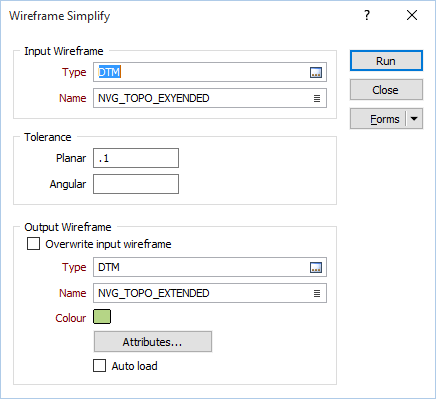
Select the type of the wireframe and then enter (or double-click to select) the name of the wireframe that will be used as input to the Simplify process. Wireframe types are defined in a triangulation database (*.tridb) file, and may be located in the current project or in any folder location.
Tolerance
Planar Tolerance
Enter a value in grid units. This is the maximum amount that the triangulation is allowed to move in any direction after vertices are removed.
If no Planar tolerance is specified, a default value of 0.01 will be applied automatically.
Angular Tolerance
The Simplify function looks at the angle between adjoining faces, and if the angle is less than the specified tolerance, AND flattening of the area does NOT violate the planar tolerance, then the area will be flattened.
If no Angular tolerance is specified, none will be applied.
Note: Specifying a large Planar or Angular tolerance will significantly alter the nature of the triangulation.
Output Wireframe
Select the Overwrite input wireframe option if you want the result of the process to be applied to the Input wireframe. If this option is selected, the following Output wireframe prompts will be disabled:
Type and Name
Specify the type and name of the Output wireframe.
Colour
Specify a default display colour for the Output wireframe.
Attributes
Click the Attributes button to set Attributes for the wireframe output.
User-defined attributes may be mapped against the fields in the Input file. It is also possible to specify a default value for each attribute. Default values are used when a corresponding value in the Input file is either missing or is not mapped.
Auto load
Select this option to load the generated output in Vizex. The default draw style for an auto-loaded wireframe is 3D Shaded.
Forms
Click the Forms button to select and open a saved form set, or if a form set has been loaded, save the current form set.
Run
Finally, click Run to begin the process.
 SEE ALSO