Scales Devices
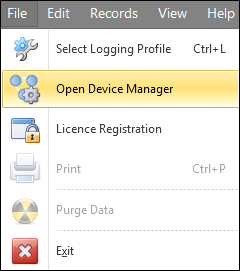
- Select File | Open Device Manager.
- Select a Scales device from the list, or add a new Scales device if one is not already configured.
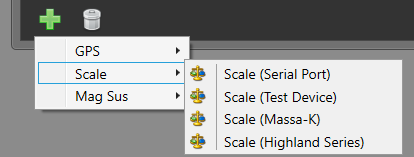
New devices can be added by clicking on the Add button and selecting an option:
Geobank Mobile is designed to receive the Gross Weight data from a Highland Series scale in 'Format 2' - In the scale's mode settings, this is under F3 as 'For 2'.
For a technical reference on how to setup and use the scale, refer to:
- Scales Technical Reference
You can also visit the manufacturer website:
https://www.adamequipment.com.au/highland-portable-precision-balances
Devices can be removed by highlighting the device and clicking on the Trash Can.
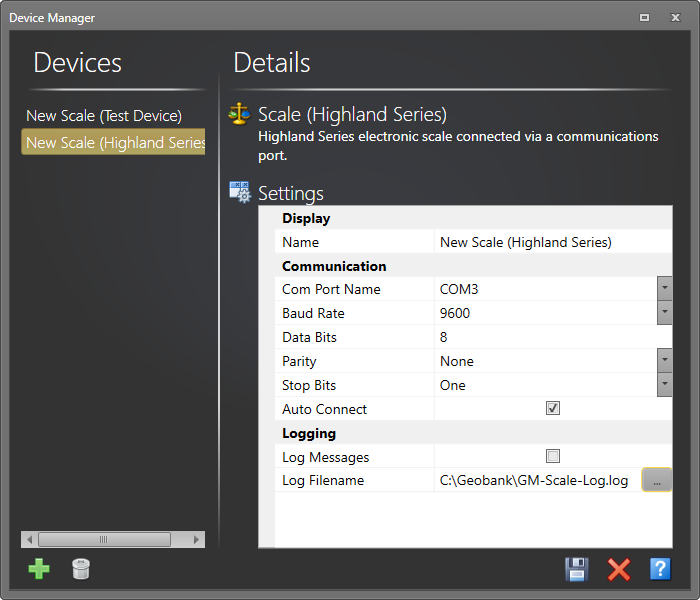
- Input the settings for your device.
Set the BAUD RATE to 4800, 9600, 19200 or 38400.
Set the PARITY to NONE, EVEN, or ODD. 8 data bits and one STOP BIT are always used, (8n1, 8E1, 8o1).
Note: The default settings for Highland scales are as follows:
-
Baud Rate : 9600
-
Data Bits : 8
-
Parity : None
-
Stop Bits : One
-
Auto Connect : True
See: Device Support: Scales for more information.