Pit & Blasthole Design
New Features
 Mining | Pit Design | Load Pit Design
Adjust to Optimised Pit Shell
Pit shells provide the basis for more detailed pit design and for long-term scheduling. Using an optimised pit shell in conjunction with the Auto-Build pit tool allows you to fast-track the pit design process and eliminates the need to manually modify the pit strings on each bench.
When the Adjust to Optimised Shell Boundary option is enabled on the Build to Shell tab of the Pit Design form, the projected pit design strings are automatically adjusted to match the limits of an optimised pit shell.
A Loose (Polynomial Approximation) smoothing method smooths the shell boundary based on a smoothing tolerance that controls the length of a "moving" path used to calculate new vertices. The curve does not pass through any of the vertices of the original strings or segments, except the first and last.

Specific Pit Parameters can be incorporated into the design, for example double benching.
Note: Pit roads will be retained unless modifying the strings will lead to the loss of a road point. In such cases you will be given the option to continue to build the pit, or pause the process to add a new road point and then continue to build the pit.
The tool will prioritise the use of design parameters specified in the Pit Parameters grid, followed by any specified on the Variable Constraints tab. The default parameters (including the ones on the toolbar) have the lowest priority of use
Enhancements
Mining | Road Design
Write Left and Right Road Strings
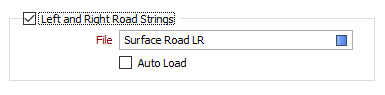
You can now select an option to write left and right road strings to an Output file and auto load those strings in Vizex.
Mining | Blasthole Design
Firing Sequence
New firing pattern options are now available when you use the firing sequence tool on the Blasthole Design toobar (Mining | Blasthole Design | Firing Sequence):
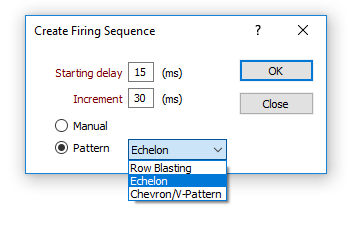
| Row Blasting | Select 2 holes to identify the first row to be fired. A row-by-row firing sequence is then generated from that row. |
| Echelon | Select 2 holes adjacent to the free face of the pattern to generate an echelon firing sequence where the row closest to the free face is fired first, followed by the row behind it and so on. |
| Chevron | Select 3 holes to define a chevron or v-like pattern that will be replicated to define the firing sequence. |
For more information, see: Firing Sequence Parameters