Select Scripting | Open Script Editor to create or edit a Python (*.py) script. The following options are provided on the Script Editor toolbar:

|
Click the Run button (or press F5) to run the current script. |

|
Click the New button to open a tab for a new script. |

|
Click the Load button to load an existing script into the editor. |

|
Click the Save button (CTRL + S) to save your changes to the current script. |

|
Click the Save As button to save your changes as a new script. Note: If the File selection defaults to current path option is selected in Tools | Options | Form Sets, the Save prompt will now default to the current (last selected) file path, rather than default to the current project folder. |

|
Click the Clear button to clear the contents of the current tab. |

|
Click the Find button (CTRL + F) to search for occurrences of a search string in a script. A search can be case-sensitive and you can search in an Up or Down direction. |
| You can also press CTRL + H to run a Find and Replace operation. When using keyboard shortcuts make sure the Editor window has focus. | |

|
Click the Options button to set various options which are also available in Tools | Options | Script. |

|
Click the Show/Hide Reference Pane button to toggle the display of a Script Editor Reference Pane on and off. |
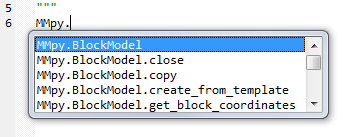
| For help about a particular Python function, type MMpy. in the Editor window to select from a list of functions:
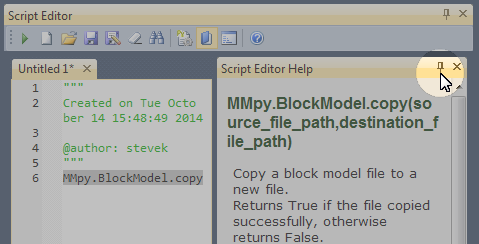
When the Show/Hide Reference Pane button is enabled and a function name is selected in the Editor window (see example below) help about that function is shown in the pane.
You can copy and paste portions of the Reference Pane while editing a script. You can also pin and unpin the Reference Pane to the side of the Editor window. |
|

|
Click the Show/Hide Script Output button to toggle the display of the Script Output Pane on and off. When the button is on, output is displayed in the pane when you run a script. |
| You can use CTRL+C to copy the contents of the pane to the clipboard. | |

|
Click the Help button to display online help about the Script Editor. |
Note: You can also use the Scripting Toolbar to open the Script Editor, start and stop recording a script and run your favourite scripts and macros.
 SEE ALSO