Device Support: Magnetic Susceptibility
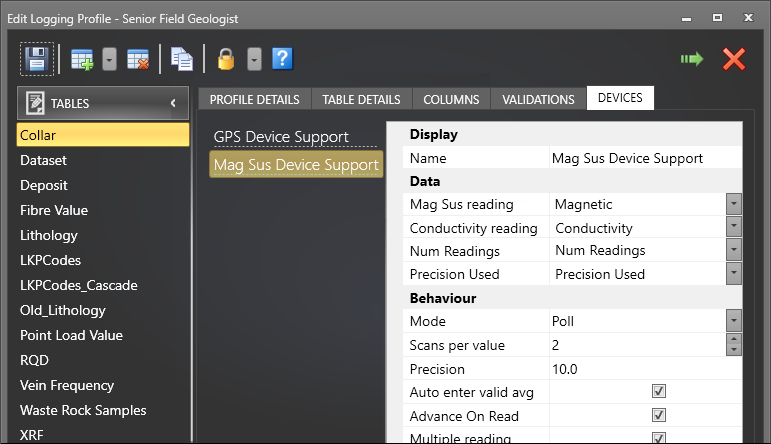
Geobank Mobile can connect and receive data from KT-10 Magnetic Susceptibility/Conductivity devices. When a device is added to a table, the following device support settings must be defined:
If your device was disconnected when Geobank Mobile was opened, and you connect it, to reconnect you must select that device from the Connected Devices drop-down tool menu on the Main toolbar before you can take readings from that device. The status of the device can be seen using the Device Status panel.
Setup for capturing a measure to the currently selected cell
When you need to capture more than one measure within the same row; for example, two or more Mag Sus readings along the length of a core sample; then leave all data values un-mapped in the Device Support pane. The reading from the device will then be stored in the selected cell. The reading capture will depend on the mode used in the Device Manager – Use either the Magnetic Susceptibility mode or the Conductivity mode, not the Dual mode.
Display
Enter the name of the device as it will appear in the Device Manager window.
Data
Select the fields that will be used to record the Magnetic Susceptibility and/or Conductivity readings, the number of readings taken for each measure, and the precision used for each measure. The measure readings you can record will depend on your configuration of the device, and will be one of the following:
- Magnetic Susceptibility
- Conductivity
- Magnetic Susceptibility and Conductivity (if the device is setup to capture one reading per row, only the Mag Sus reading is recorded)
- Conductivity and Magnetic Susceptibility ( (if the device is setup to capture one reading per row, only the Conductivity reading is recorded).
See: Magnetic Susceptibility Device
Behaviour
These settings determine how the device will behave as you interact with Geobank Mobile.
Mode
Select a (Scan, Poll) operating mode:
| Mode | Description |
|---|---|
| Poll | Continually check (poll) for a new value from the device and record the value (after the user has taken a scan and stored the result on the device). |
| When taking a reading in Poll mode, you will need to long press the Up button to store the result before it is output to Geobank Mobile. This makes it possible to abort a bad reading and then re-take the reading. | |
| Tip: It is recommended that you use Poll mode rather than Scan mode, since Scan mode will only return the value that was last stored on the KT-10. If no results are saved to the KT-10, then Scan mode is unable to return anything. | |
| Scan | Immediately request the KT-10 device to return the last stored value. |
| Note that even if the user has configured the Scan(s) per value > 1 and selected the Multiple reading check box in Scan mode, the KT10 device will always return the last stored result. Hence, the connected device icon will turn off automatically after retrieving the last stored result on the KT10 device |
Scans per value
Set the number of scans to take that will be averaged by Geobank Mobile into a single stored value. This is done in the “Readings from device” dialog when the user is collecting readings - see Recording data from a device.
Precision
Enter a positive value (conceptually this means within x% of the average) to define the precision that is required when taking multiple values and calculating the average. The precision of the average of the readings taken by the Magnetic Susceptibility meter are calculated using an absolute value:
IndividualPrecision =
ABS((AvgOfReadingsUsed - ReadingValue) / AvgOfReadingsUsed * 100)
Auto enter valid average
When this option is selected and you are scanning multiple times for a value, select this option to automatically enter the average once the required number of valid scans have been entered.
When this option is enabled in the profile, an average is automatically calculated as readings are taken, and this value is returned to the row once the target has been reached.
When this option is disabled in the profile, an average is still automatically calculated as readings are taken, however to return this value to the row, the user will need to manually click the Enter Value button on the Device Reading screen.
Advance on read
When this option is selected, if a field is active and you receive data from the device for that field, the application will advance to the next record once the data has been recorded. This is the recommended setting if multiple values are being collected from the device and inserted into nominated columns in a row.
If deselected, Geobank Mobile simply moves the cursor to the next cell after the reading (or readings). Note: This is the recommended setting when multiple values from a device are being captured in sequential cells on the same row.
A third alternative is to configure and use an Auto-advance setting for the column. Auto-advance overrides the Advance on Read behaviour.
Multiple reading
It may sometimes be necessary to take multiple single readings. When this option is selected it will allow the user to take multiple readings without having to press the device button on the user interface each time.
In scan mode, the application will return the number of reading taken by the user as defined by Scans per value. If the operating mode is Poll, then the Magnetic Susceptibility meter will return the last stored value multiple times, as defined by Scans per value
Store with note
Geobank Mobile does not currently support the Store with note option on the KT-10 device.